 Swiftify
Immersive player
A full screen now playing view with a liquid background drawn from the artwork, it moves with the song too...
A desktop Spotify player built with Qt Quick and a Rust core around librespot. Material 3 Expressive styling and eyecandy everywhere, visualizers, an equalizer and STILL lighter on CPU and RAM than Spotify's own client.
A full screen now playing view with a liquid background drawn from the artwork, it moves with the song too...
obviously
Spectrum bars, the background and a halo all drawn on the GPU.
Customize the sound with an equalizer, and change the tempo and pitch of your songs.
For all your "legally" obtained songs, you can edit every track's metadata.
Top songs, artists, albums and genres, from stats.fm or from a local history. No data collection here!
Show what you're listening to on Discord. (optional)
Uses less CPU and RAM than Spotify's client and all its renderers, even with all the extra eye candy turned on.
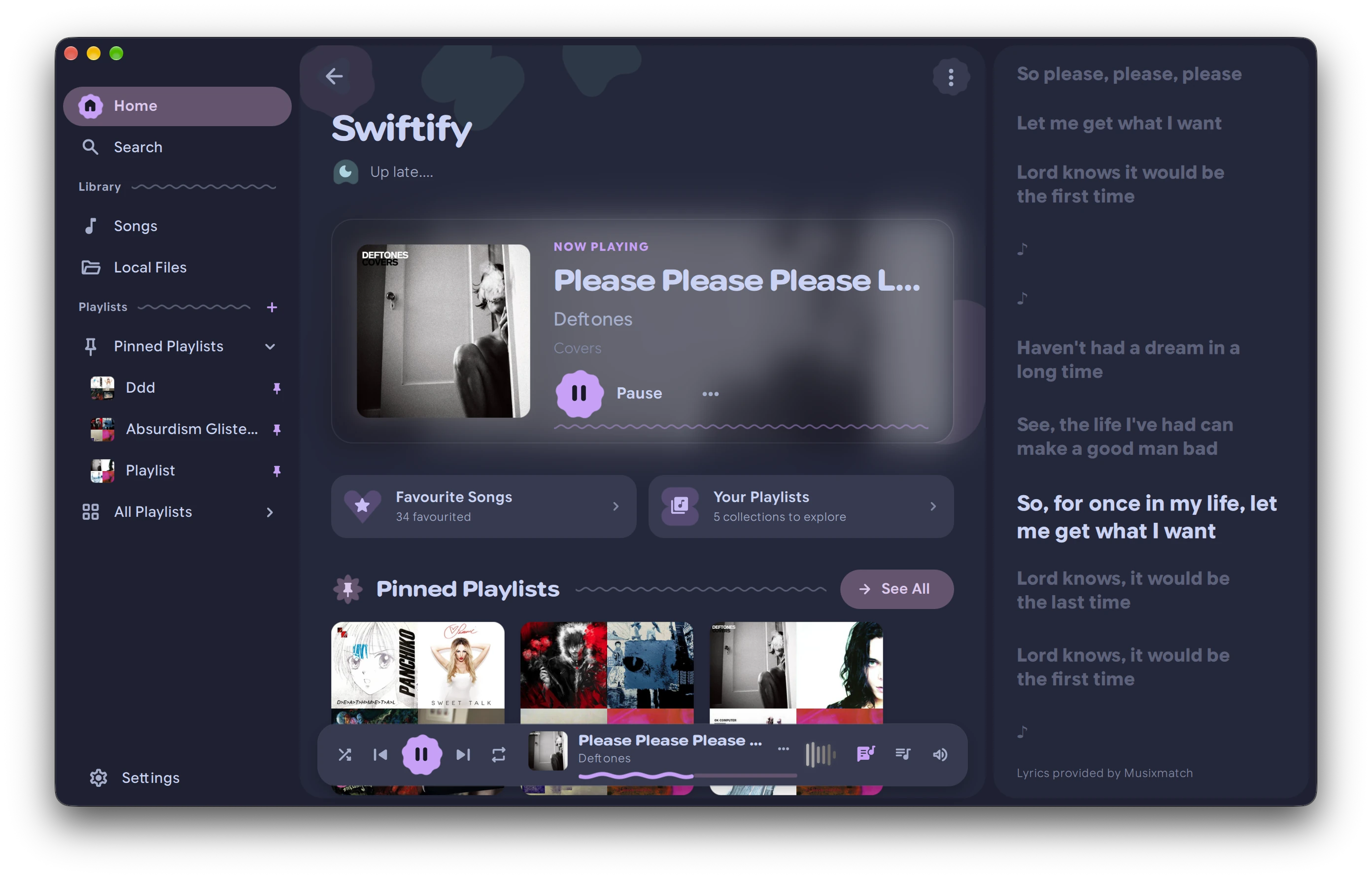
The home screen
Prebuilt builds of the latest release. Each one brings its own Qt, so there's nothing else to install.
Apple silicon · .dmg
xattr -dr com.apple.quarantine /Applications/Swiftify.app.x86_64 · .zip
bin\swiftify.exe. Dont move the .exe though... create a shortcut.x86_64 · .tar.gz
bin/swiftify. It needs ALSA and libsecret, which nearly every desktop already has.makepkg -si in packaging/arch builds it from source.Playback goes through librespot, which only works with a Premium account.
Your library, playlists and search come through your own app in the Spotify developer dashboard. Add http://127.0.0.1:8898/login as a redirect URI and paste the client ID into Swiftify on first launch. No client secret needed.
PLEASE read these before opening github issues..!
No, Swiftify needs Spotify Premium. Playback goes through librespot, which only works with Premium, and Spotify heavily limits API access for free accounts. Connecting a free account makes the app close with a 403 error.
Issue #88First make sure the account has Premium and that you pasted the client ID of your own app from the developer dashboard. If it still happens, for example after switching from a free account to a Premium one, sign out everywhere from your Spotify account page (“Sign out everywhere”) and connect again.
Issue #93If the logs show error audio key 0 1, Spotify is refusing librespot the keys to decrypt songs, which happens on newer accounts and affects every app built on librespot. Swiftify can play through Spotify Soloist instead, which isn't affected.
Yes. Since Spotify's API change in February 2026, the web API only returns the name and cover of playlists you don't own, so Swiftify loads their songs through librespot instead. Your own and collaborative playlists load as before.
Issue #3An error like “The name is not activatable” means no Secret Service daemon is running, so Swiftify can't save your login. Install and start one, such as KDE Wallet or GNOME Keyring, and the login sticks.
Issue #2The app is signed ad hoc, so macOS blocks the first launch. Open it anyway from System Settings › Privacy & Security, or run xattr -dr com.apple.quarantine /Applications/Swiftify.app. It needs macOS 14.4 or newer on Apple silicon.
Region blocks come from Spotify and librespot, so Swiftify can't change them, and a VPN or Cloudflare WARP may not help.
Issue #81This has come down to the audio device so far. Try another output, or unplug and reconnect your audio interface, and check its drivers.
Issue #94Yes. Turn it on under Settings › Account › Discord Rich Presence. It's off by default. It shows the song, artist, cover and whether it's paused, but Listen Along isn't supported.
Issue #45Yes. Launching Swiftify again passes the command to the copy that's already running, so swiftify --play-pause, --next, --previous, --immersive and --stats work well as keybinds, for example in Hyprland. The immersive player also has its own button in the app, and a fullscreen mode.
No, RPM packages won't be maintained. The Linux tarball brings its own Qt and runs on any distribution, and Arch users can build from packaging/arch with makepkg -si.
Not at the moment, and it isn't planned for now.
Issue #95